


The Monterey Park Learning Center is a dedicated company venue designed to facilitate and inspire impactful learning experiences, including classes, workshops, team-building activities, and guest speaker events. Conveniently located at the Monterey Park (MPK) facility near downtown Los Angeles, the Monterey Park Learning Center serves as a central hub for on-site collaboration and professional development.
Scroll down for descriptions of the Monterey Park Learning Center's reservable spaces and instructions on how to submit a request for your learning event. Scheduling for non-learning and development uses will be based on availability.
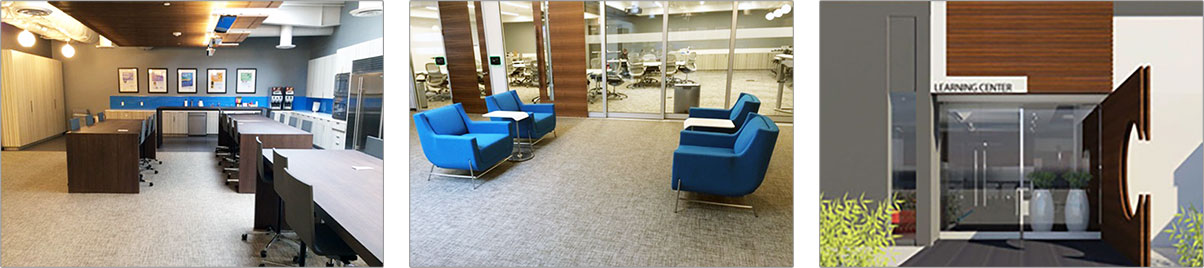
Room reservations for the larger conference rooms at the Monterey Park Learning Center are managed through the Facilities website. Instructions for using this reservation system can be found here. Smaller conference rooms can be reserved through Outlook.
Descriptions and maximum occupancies for the Monterey Park Learning Center rooms are provided below.
- Rooms 0022 + 0023 (Formerly known as Breakthrough Hall A and Breakthrough Hall B.)
- Reservable through the Conference Experience app on the Facilities website.
- Facilities setup is required. See the Conferencing Experience app for options.
- Max capacity: 30 per side, 60 total when combined.
- There is a movable partition that can combine both rooms into one large room.
- SPECIAL TECHNOLOGY▼
- Microsoft Teams Enabled Rooms;
- (2) 130" Diagonal Advantage Tensioned Screen;
- (2) Large Venue Projector;
- (3) Panasonic HD Conferencing Cameras;
- (6) Conferencing Ceiling Microphones;
- (2) Handheld Microphones;
- (2) Lavalier Microphones;
- (12) Ceiling Speakers;
- (2) Clickshare Wireless Presentation;
- (4) HDMI Presentation;
- (2) Bluetooth Audio;
- (2) AV Room Controller Touchpanel;
- (2) Crestron Teams AV Controller Touchpanel;
- (2) USB BYOD Conferencing Capability.
- Room 0015 (Formerly known as the Collaboration Room.)
- Reservable through the Conference Experience app on the Facilities website.
- Conference / Boardroom is standard. No setup required.
- Max capacity: 15.
- SPECIAL TECHNOLOGY▼
- Microsoft Teams Enabled Room;
- (2) 86" 4K LCD Displays;
- (1) Logitech Rally Conferencing Camera;
- (1) Crestron Mercury Conferencing Microphone/Speaker;
- (1) Crestron Teams AV Controller Touchpanel;
- (1) Clickshare Wireless Presentation;
- (1) HDMI Presentation.
- Room 0016 (Formerly known as the Imagination Room.)
- Reservable through Outlook.
- Small round table and 2 chairs is standard. No setup required.
- Max capacity: 3.
- SPECIAL TECHNOLOGY▼
- Microsoft Teams Enabled Room;
- (1) 65" 4K LCD Display;
- (1) Huddly Auto Tracking Conferencing Camera;
- (1) Crestron Conferencing Microphone/Speaker Soundbar;
- (1) Clickshare Wireless Presentation;
- (1) HDMI Presentation;
- (1) Crestron Teams AV Controller Touchpanel.
- Room 0017 (Formerly known as the Reflection Room.)
- Reservable through Outlook.
- Small round table and 2 chairs is standard. No setup required.
- Max capacity: 3.
- SPECIAL TECHNOLOGY▼
- Microsoft Teams Enabled Room;
- (1) 65" 4K LCD Display;
- (1) Huddly Auto Tracking Conferencing Camera;
- (1) Crestron Conferencing Microphone/Speaker Soundbar;
- (1) Clickshare Wireless Presentation;
- (1) HDMI Presentation;
- (1) Crestron Teams AV Controller Touchpanel.
- Room 0021 (Formerly known as the Discovery Room.)
- Reservable through Outlook.
- Conference / Boardroom is standard. No setup required.
- Max capacity: 10.
- SPECIAL TECHNOLOGY▼
- Microsoft Teams Enabled Room;
- (1) 4K LCD Display;
- (1) Huddly Auto Tracking Conferencing Camera;
- (1) Crestron Conferencing Microphone/Speaker Soundbar;
- (1) USB C Presentation;
- (1) USB C BYOD Conferencing Capability;
- (1) Crestron Teams AV Controller Touchpanel.
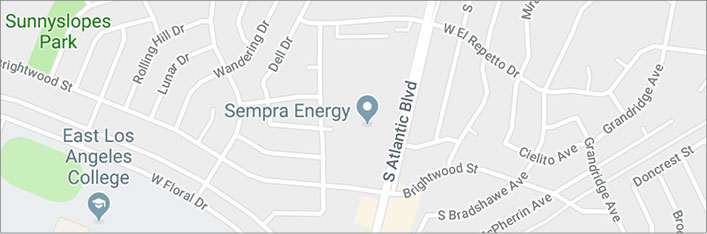
Monterey Park Learning Center
1801 S. Atlantic Blvd.
Monterey Park, CA 91755
(Google Map)
Click here for instructions on how to get to the Monterey Park Learning Center (Building C) once onsite.
 Not finding what you're looking for? Contact us today!